Capacity Management
CenterOS gives you a clear, graphical view of every rack, room, and resource in your data centre. Manage space, power, and cooling from a single interface, from any location, without stitching together spreadsheets or walking the floor to count rack units.
Full Visibility Over Space, Power, and Cooling
CenterOS maps your entire data centre floor to scale. Every room, every rack, and every piece of equipment is accounted for. You can see where capacity is tight, where headroom exists, and where your next deployment can land - without a floor walk.
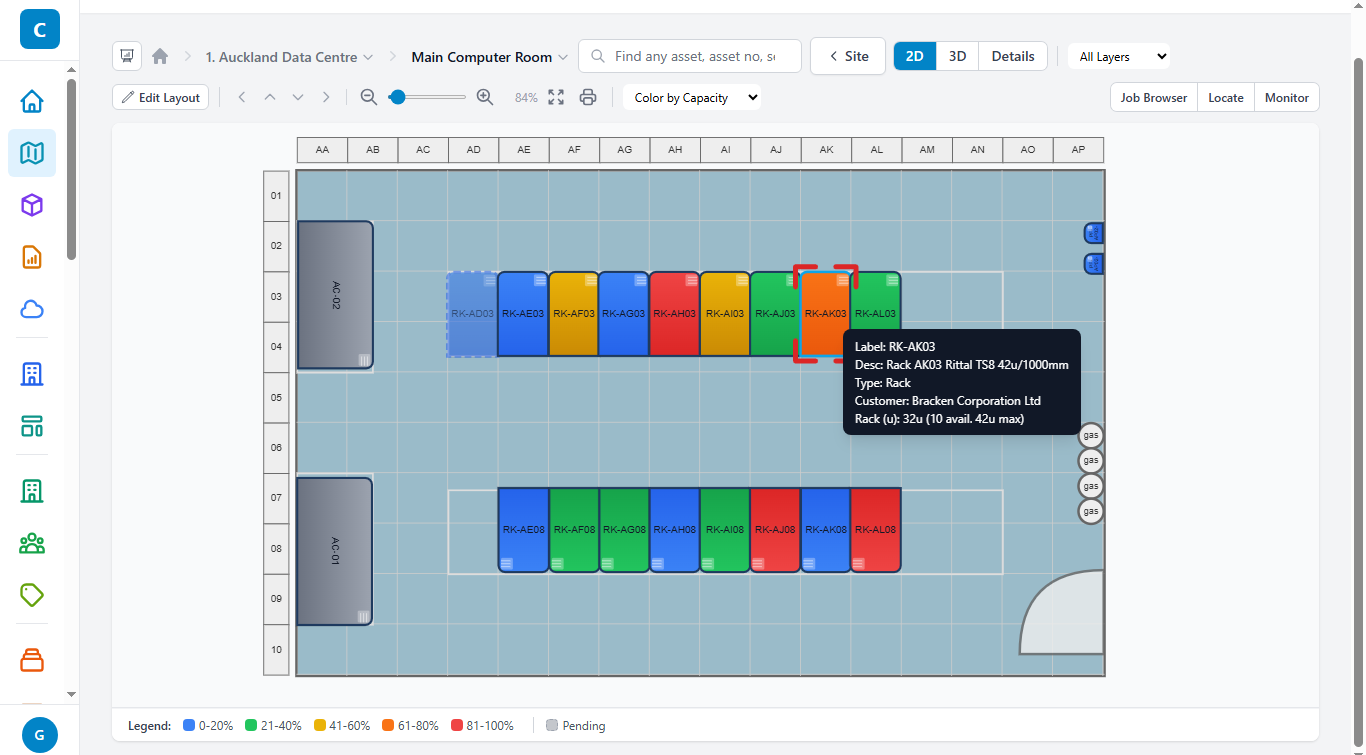
Rack capacity by colour, at a glance
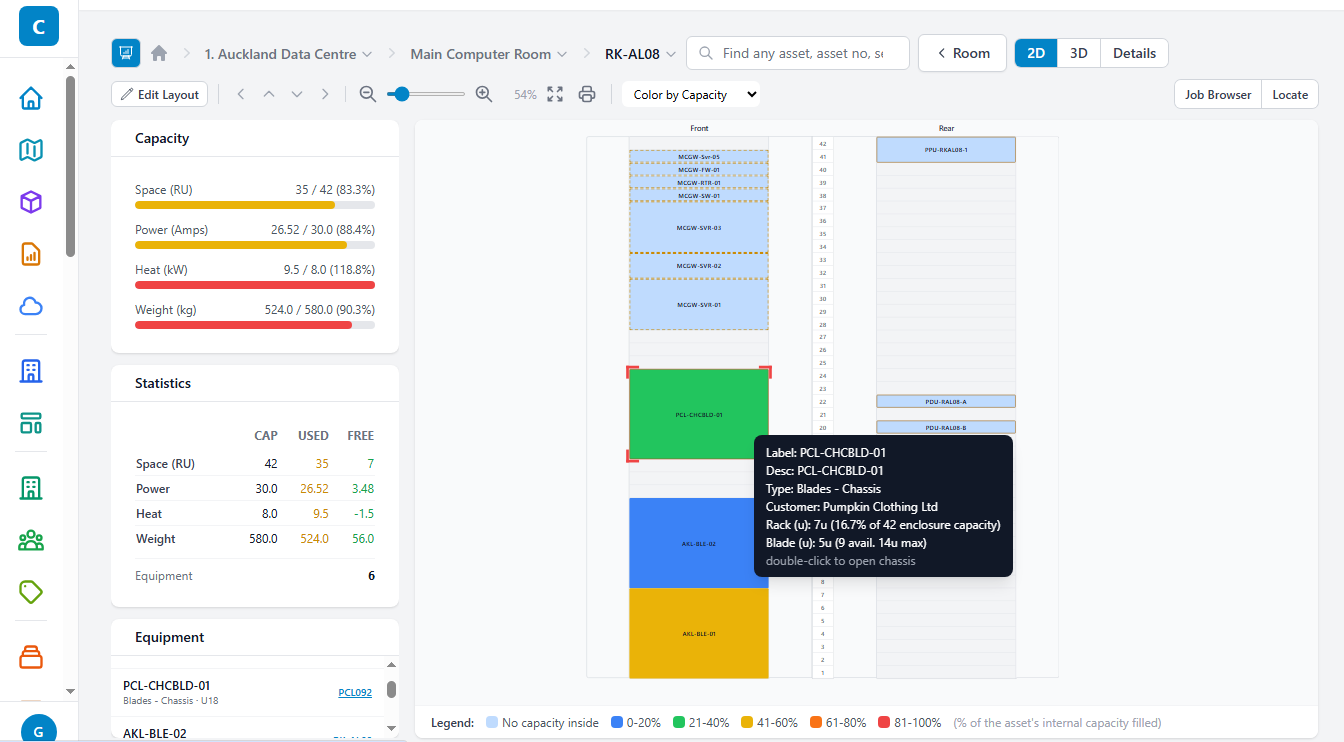
Blade and switch capacity at the rack level
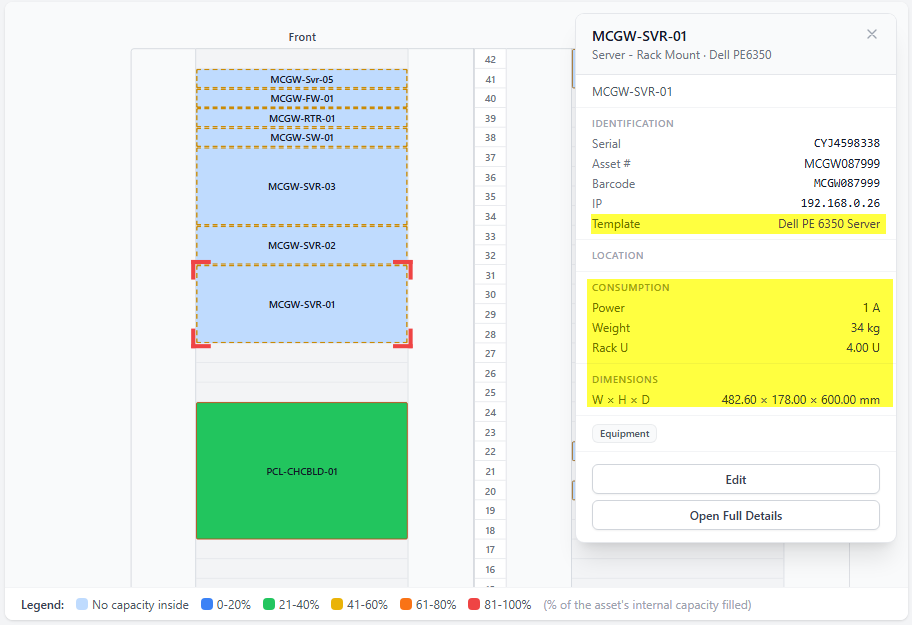
Resource detail for individual equipment
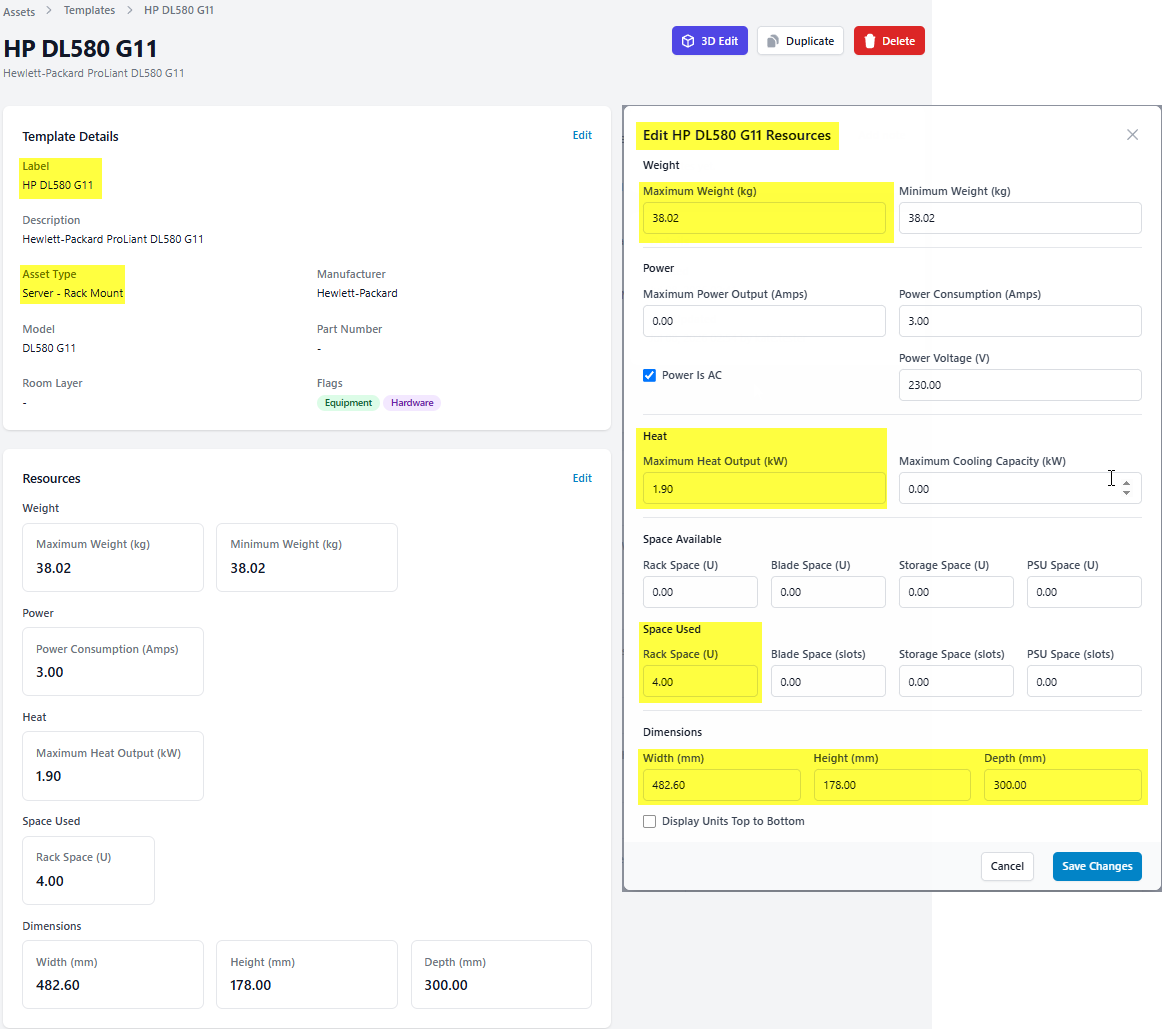
Add equipment fast using the template library
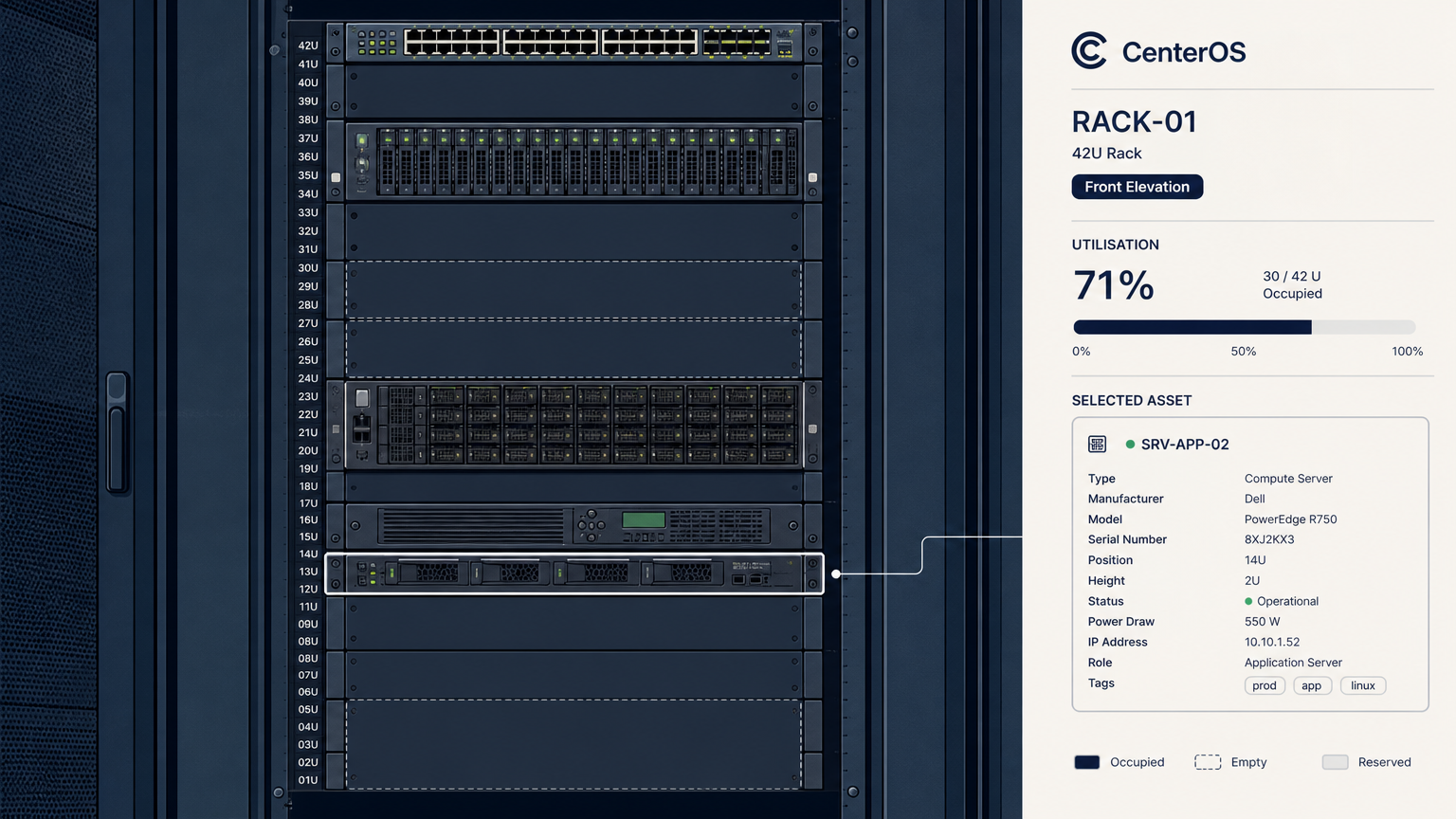
Colour Coding for Instant Clarity
The default rack view uses colour to show utilisation instantly. Orange, for example, means 66.7% of rack units are occupied - say, 28 of 41U filled. You see the status of every rack without opening a single record.
Drill down to front and rear elevations to confirm exact equipment positions, check available slots, and inspect blade enclosures. No guesswork about what fits where.
Switch the room schematic between heat load, weight, and connections views. Each asset contributes its own values to the room totals, and those values are editable. The resources tab lets you update weight, power draw, heat output, physical dimensions, and space allocation per asset.
Equipment Template Library
The template library holds resource specifications for common equipment types. When you add a new asset, pick its template and CenterOS fills in the vendor specs automatically: power draw, heat output, weight, dimensions, and rack space. No hunting through datasheets, no re-entering the same numbers for identical devices.
Templates keep your data model accurate from the moment an asset is created. That accuracy matters: the AI capacity forecasting and anomaly detection built on top of this data are only as useful as the underlying records are complete.
Stuck Between Legacy DCIM and Cloud-Only Tools
Legacy DCIM Stalled
The incumbent platforms can deploy on-prem - but they're expensive, dated, and slow to implement, and their new AI features phone home to the vendor's cloud. Their roadmaps have moved on to hyperscale.
Modern SaaS Can't Come Inside
The new generation of DCIM has the experience your team wants — but it's cloud-only. If policy, prudence, or your regulator says infrastructure data stays in your control, it's disqualified before the demo.
The Estate Got Harder Anyway
AI-era rack density is breaking spreadsheet capacity management, auditors want evidence instead of screenshots, and experienced operators keep leaving for cloud roles.
Modern DCIM. Real AI. Your Choice of Boundary.
CenterOS brings AI inference, models, and the data they learn from entirely inside the customer's control perimeter, built on a complete and mature data model of assets, power, cooling, and physical connections that makes capacity forecasting, anomaly detection, and impact analysis credible rather than decorative. It delivers AI-assisted change tracking, a continuous evidence trail an auditor will accept, and agentic AI that carries routine operational load under human approval. One platform, three deployment models: multi-tenant SaaS, dedicated private cloud, and fully sovereign on-premises including air-gapped.
A Foundation You Can Trust
Full asset lifecycle with seven-dimensional capacity tracking, live floor plans and rack elevations, monitoring that speaks SNMP, Modbus, BACnet, MQTT, IPMI and Prometheus, and SLA-driven change management - one data model, in production today.
AI With a Safety Harness
CenterosAI agents answer plain-English questions, plan capacity, and correlate incidents. Agents propose, humans approve, the system audits - every recommendation carries a confidence score and a trail.
Deploy Anywhere — Up to Sovereign
Start on SaaS in a week, move to a dedicated private cloud, or run fully on-premises where even the AI runs on your own GPUs - including air-gapped. Same product, your boundary.
How CenterOS Works
Choose Your Boundary
Start on multi-tenant SaaS, a dedicated private cloud, or deploy entirely inside your own perimeter — the platform is the same in all three.
Connect Your Estate
Import from spreadsheets, NetBox, Ralph or legacy DCIM, then connect PDUs, UPSes, cooling, sensors and servers over the protocols you already run.
Operate With Foresight and Evidence
Capacity checks at planning time, alerts that open SLA-bearing jobs, AI agents under human approval — and an audit trail that doubles as regulator-ready evidence.
Frequently Asked Questions
Yes. On the sovereign on-premises deployment, everything — including AI inference — runs inside your own boundary, air-gapped if required. On SaaS and dedicated cloud, your workspace is isolated (schema-per-tenant or a dedicated VPC) and hosted in-region. You choose the boundary; the product is the same.